

Payouts to Pix
This guide details a step-by-step implementation of payouts to Pix.
Introduction
This guide explains how to use Integrated Payouts to send BRL to Pix accounts with the non-Pockyt wallet configuration.
Prerequisites
- Merchant Account Setup: Ensure the merchant has an active Pockyt account and has been approved for BRL Pix Payouts.
- API Credentials: Obtain the
merchantNoandstoreNovalues from Pockyt. - Webhook Configuration: Set up
ipnUrlto receive transaction status updates. - Banking Requirements: Ensure the payee has a valid Pix Key (CPF, CNPJ, Email, Phone, or Random Code).
- Regulatory Compliance: Merchants must adhere to KYC and AML regulations. Brazilian payees typically require a valid CPF/CNPJ.
API Workflow (Sequence Diagram)
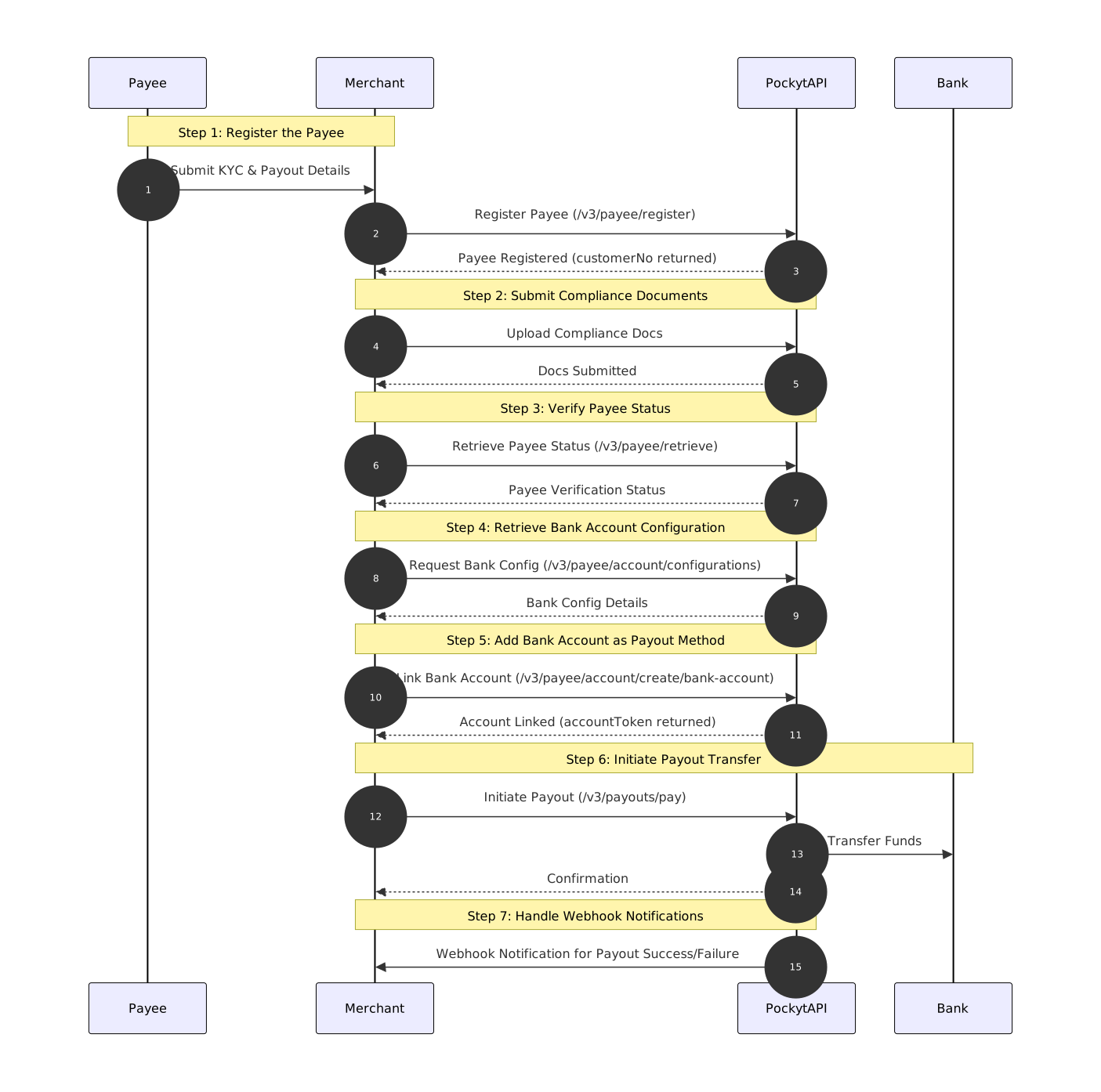
Step-by-Step Breakdown of the Payout Workflow
📘 API References for Workflow Steps
- Step 1: Register Payee (
/v3/payee/register) - Step 2: Submit Compliance Documents
- Step 3: Verify Payee Status (
/v3/payee/retrieve) - Step 4: Retrieve Bank Account Configuration (
/v3/payee/account/configurations) - Step 5: Add Pix Account as Payout Method (
/v3/payee/account/create/bank-account) - Step 6: Execute Payout (
/v3/payouts/pay) - Step 7: Handle Webhook Notifications
Step 1: Register Payee
Action: The merchant registers a payee in Pockyt's system to generate a customerNo. This identifier is required for all subsequent payout steps.
Key Considerations:
- The
profileType(INDIVIDUALorBUSINESS) determines the required fields. - The payee's email and
governmentIdmust be unique. - The
customerNoreturned here is needed in Steps 5 and 6.
Step 2: Submit Compliance Documents
Action: The merchant submits identity verification documents (e.g., CPF/CNPJ proof, passport) for compliance review.
Key Considerations:
- Payee accounts are initially set to
ACTIVEupon creation. However, certain trigger events in compliance reviews may change their status toPENDINGorDECLINED. - The merchant must verify the payee's status before initiating a payout to ensure funds are not sent to an ineligible payee.
Step 3: Verify Payee Status
Action: Query the /v3/payee/retrieve endpoint to confirm whether the payee is ACTIVE for payouts.
Key Considerations:
- If the status is
PENDING, the payee may be under additional compliance review. - If the status is
DECLINED, additional documents may be required. - Payee status can change dynamically based on compliance requirements, so always check the status before payouts.
Step 4: Retrieve Bank Account Configuration
Action: Call /v3/payee/account/configurations to retrieve the required parameters for linking a payee's Pix account.
Example API Response:
[
  {
    "profileType": "INDIVIDUAL",
    "accountType": "BANK_ACCOUNT",
    "accountCurrency": "BRL",
    "accountCountry": "BR",
    "fields": [
      {
        "isRequired": true,
        "name": "pixKey",
        "label": "PIX Key",
        "maxLength": 64
      },
      {
        "isRequired": true,
        "name": "ownerDocument",
        "label": "Owner Document",
        "maxLength": 64
      },
      {
        "isRequired": true,
        "name": "pixKeyType",
        "label": "PIX Type",
        "maxLength": 20
      }
    ]
  }
]
Step 5: Add Pix Account as Payout Method
Action: Register the payee's Pix account using /v3/payee/account/create/bank-account.
Key Considerations:
- The
customerNofrom Step 1 is required in this request. - The
ownerDocument(CPF/CNPJ) andpixKeymust belong to the same registered payee to avoid rejection. - The response returns an
accountToken, which serves as the payment token for this payout method. - This
accountTokenmust be included in Step 6 to execute the payout.
Example accountToken: 2010378298556879970563
Step 6: Initiate Payout Transfer
Action: Execute a payout to the payee's Pix account via /v3/payouts/pay.
Key Considerations:
- The
customerNofrom Step 1 and theaccountTokenfrom Step 5 are required. - Ensure the
amountdoes not exceed the merchant's available balance. - The
invoiceIdshould be unique to avoid duplicate payouts. - The
ipnUrlis critical for receiving transaction updates. - This API request only confirms that Pockyt received the payout request. It does not confirm that the funds have been deposited.
Step 7: Handle Webhook Notifications
Action: The webhook is triggered to notify the merchant of the final transaction status.
Purpose: The initial API response in Step 6 does not confirm that the payout has been completed. Webhook notifications indicate whether the payout is PENDING, SUCCESSFUL, or FAILED. The webhook contains the transactionNo and status.
Updated 3 days ago